MFA and login to the Politecnico

The Politecnico di Torino has implemented a single sign-on system for all IT services within its community, providing secure access to the University’s digital services through a common Identity Provider (IDP) with secure credentials and Multi-Factor Authentication (MFA). Through the portal idp.polito.it, users can manage all aspects of their digital identity: configure different multi-factor authentication methods (MFA), change their password, review active sessions, and request support. Key features of the new IDP include support for unified Single Sign-On (SSO) and Single Log-Out (SLO), allowing users to access and exit online services using a single set of credentials. This simplifies the user experience by reducing the need to remember multiple passwords. The new IDP supports various authentication methods, including passwords, CIE (Electronic Identity Card), SPID, Digital Certificates, and eIDAS. To further enhance security, multi-factor authentication (MFA) is required, providing an additional verification step beyond the password.

 

  1. Visit the page idp.polito.it.
  2. Select “Access” to proceed with the login, if you are not already signed in.
  3. In the @Poli tab, enter your institutional credentials (name.surname@polito.it or name.surname@studenti.polito.it). You can also use CIE, SPID, or Digital Certificate by selecting the corresponding tab. Link 🔗
  4. If no MFA method is active, you will be prompted to set up a second authentication factor.
  5. If you choose to postpone, the system will ask you to configure it at your next login.

  1. By clicking “Proceed”, you can manage additional MFA methods. By selecting “Add Authentication Method”, you can add other multi-factor authentication mechanisms.
  2. The MFA authentication system via OTP (One-Time Password) SMS is the first method that needs to be configured. The system will use the mobile number you have already registered in MyPoli or the Teaching Portal. If no number is registered, or if you want to change it, you can enter a different mobile number.
  3. You will receive a security code (One-Time Password – OTP) via SMS, which you must enter in the designated field.

Key points to remember

 
Immagine
icona passkey

Additional systems

Similarly, you can configure authentication systems using Passkeys or authentication apps for managing OTP codes.

 
Immagine
icona tempistiche

Timing

After completing authentication on the device or browser used, you will be able to access for 90 days.
 
Immagine
icona accesso da nuovo dispositivo

Access from a new device

In case of login from a new device or browser, you will be prompted again for MFA authentication.
 
Immagine
icona di ricordo accesso

Remember the login

If during login you check the box “DO NOT remember login” located below the credential fields, the system will not consider the device as trusted and will require the second factor again on the next login. It is recommended to select this option when accessing from an untrusted device (self-service station, shared computer with other users, classroom or lab PC, etc.).
Check your network coverage and ensure the number entered is correct. If you are abroad in roaming, SMS delivery may not be guaranteed. For this reason, we recommend activating more than one authentication factor. Alternatively, you can log in using SPID or CIE.

You can update your mobile number independently from the Teaching Portal or MyPoli.

Immagine
schermata di recupero password

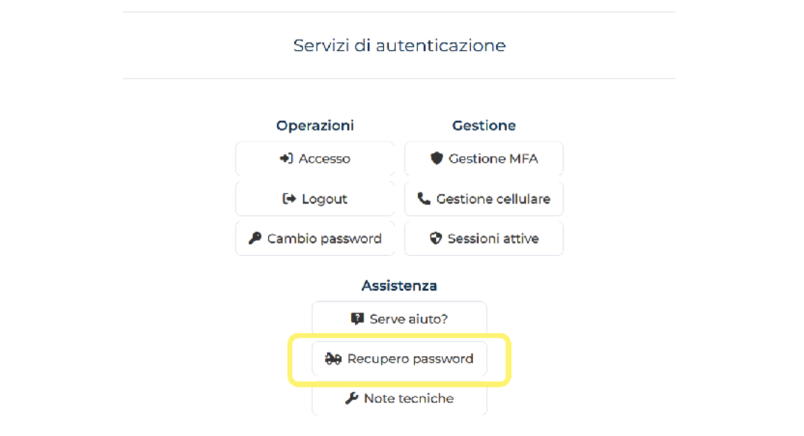
Use the password recovery function on the IDP at idp.polito.it.

  • Staff and Faculty: NO, multi-factor authentication is mandatory for all online services.
  • Students: YES, multi-factor authentication is not currently mandatory for all online services, only for some (e.g., AZURE, Microsoft Suite, certain software).
     

Useful links and additional information

By clicking on the link, you will find information and references for further details.

Who it is intended for

 
Immagine
icona docenti

Faculty

 
Immagine
icona personale tecnico amministrativo bibliotecario

Technical-administrative staff of the University