University IT Services logo

LAIB: what are the Basic Computer Laboratories?

img-9.jpg

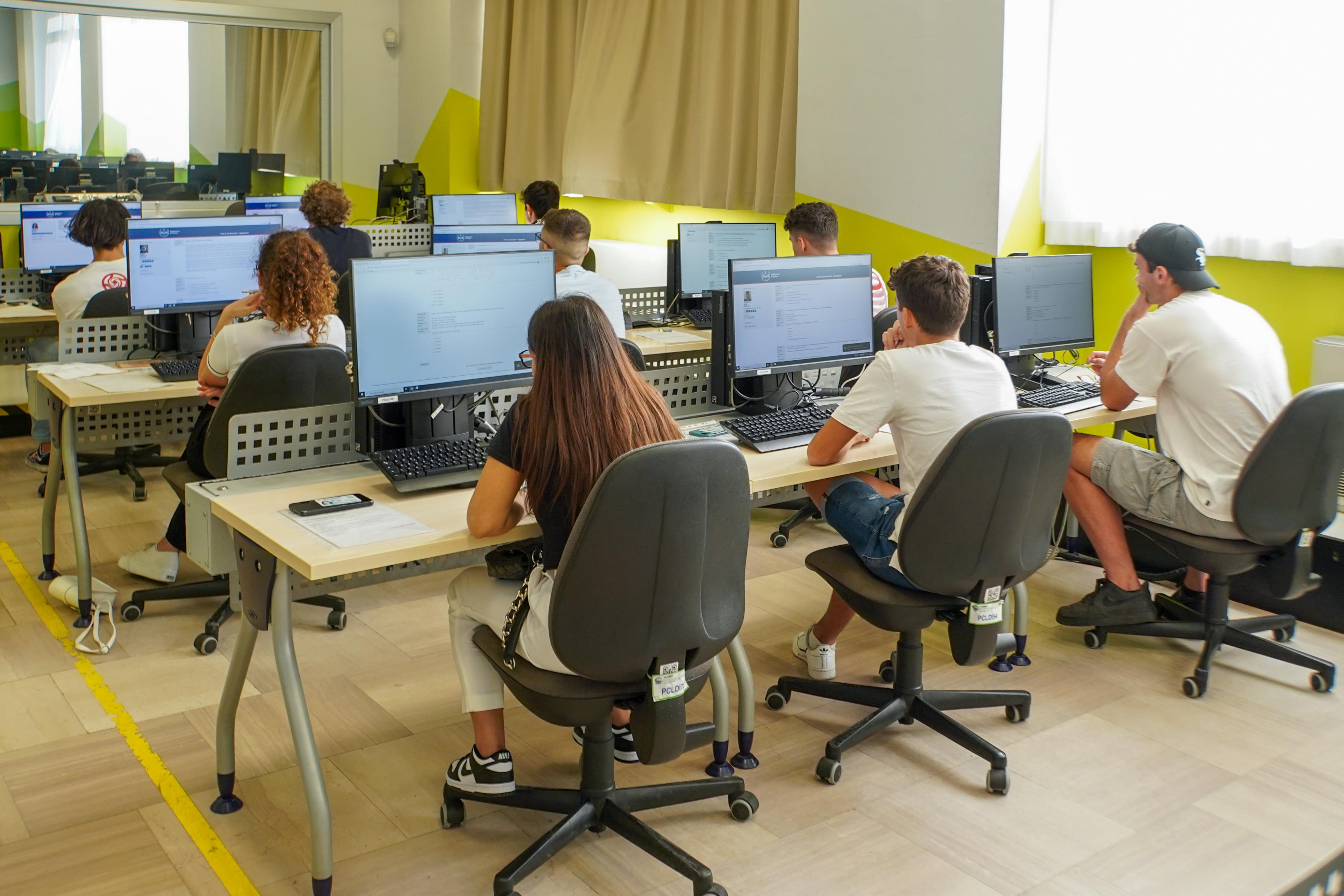
If you are part of the Politecnico di Torino student community, there is a place (both physical and virtual) that you will deal with very often during your studies: the LAIBs, or Basic IT Laboratories.

Whether you need to attend a guided lecture, review for an exam, or use specific software for your projects, here is everything you need to know to make the most of them.
The IT laboratories provide laboratory users, teaching staff, and University departments with direct access to advanced technological resources to support teaching, specialized training, and the administration of exams.

Services available to users include:

  • Use of workstations: Access to dedicated PCs and laptops for guided practical sessions, independent study, and computer-based exams.
  • Software for every degree program: Ranging from essential programs (Office suite, programming environments, etc.) to specialized technical software for modeling, computation, and simulation (such as MATLAB, AutoCAD, SolidWorks, and many others).
  • Access to dedicated tools: 3D printers, plotters, and other laboratory equipment for digital design and manufacturing activities.

The LAIBs are distributed across the main campuses of the Politecnico:

  • Main Campus in Corso Duca degli Abruzzi: Houses most of the LAIBs, including LAIB 1, 3, 4, 5, etc., located mainly along the main wings of the campus.
  • Cittadella Politecnica: Includes the laboratories located at the Via Boggio and Corso Castelfidardo complexes.
  • Other branch campuses: Some LAIBs are also present at the Mirafiori, Lingotto, and Castello del Valentino campuses.

All laboratories are open:

  • Mondays: 10:00 AM to 7:00 PM
  • Tuesday to Friday: 8:30 AM to 7:00 PM
  • Saturdays and Sundays: Closed

Click on the links in the table to find out how to reach the LAIB.

LaboratoriesLocationNo. of WorkstationsPrinters Plotters3D Printers
LAIB 1BBoggio - Via P.C. Boggio n.72 341 A3 B/W
1 A3 Color
1 A0NO
LAIB 2BBoggio - Via P.C. Boggio n.72421 A3 B/W2 A0NO
LAIB 3BBoggio - Via P.C. Boggio n.72361 A3 B/W1 A0YES
LAIB 1TTornerie – Corso Castelfidardo, 30/A301 A3 B/W
1 A3 Color
NONO
Aula 5TTornerie – Corso Castelfidardo, 30/A32NONONO
LAIB 1Duca- C.so Duca degli Abruzzi 24762 A3 B/W
1 A3 Color
1 A0No
LAIB 3Duca – C.so Duca degli Abruzzi 24621 A3 B/W1 A0NO
LAIB 4Duca – C.so Duca degli Abruzzi 24591 A3 B/W1 A0NO
LAIB 5Duca – C.so Duca degli Abruzzi 24401 A3 B/W
1 A3 Color
2 A0YES
Aula 3DDuca – C.so Duca degli Abruzzi 24781 A4 B/WNONO
Aula 5DDuca – C.so Duca degli Abruzzi 24841 A4 B/WNONO
LAIB 1MValentino – Viale Mattioli, 39321 A3 B/W
2 A3 Color
5 A0NO
LAIB 2MValentino – Viale Mattioli, 3918NONONO
LAIB 3MValentino – Viale Mattioli, 3922NO2 A0NO
LAIB 1NLingotto – Via Nizza 230321 A3 B/W
1 A3 Color
2 A0NO
EiffelLingotto – Via Nizza 23031 A3 Colori2 A0NO
LAIB 1SMirafiori – C.so Settembrini 178321 A3 B/W
1 A3 Color
1 A0NO
LAIB 2SMirafiori – C.so Settembrini 178411 A3 B/W1 A0NO
LAIB 1MVMondovi - via Cottolengo 29 Mondovì (CN)521 A3 B/W1 A0 ColorsNO

The activities held in the LAIBs fall into two main categories:

  • Those requiring prior booking: Booking is mandatory for organized activities such as courses, group practical sessions, exams, competitions, and seminars, in accordance with the "LAIB Booking Regulations". When there are no scheduled activities, you can enter the laboratories freely without a booking for educational activities, preparation of exam materials, and thesis development—while still giving priority to scheduled events. For any other unmapped activity, authorization from the ISIAD Directorate is required;
     
  • Those with free access: Subject to workstation availability.


To log in to any PC in the LAIBs, no special registration is required: simply enter your username (s<student_ID>@studenti.polito.it) and password for the Teaching Portal.

A few tips before using the LAIBs:

  • Check availability: During the academic term, many LAIBs are occupied by lectures and exams. Always check the room schedule on the Teaching Portal before going in person to confirm the open access hours.
  • Always save your files to the Cloud: The LAIB PCs are reset periodically. Do not save your work on the local drive of the workstation; instead, use cloud storage services or your personal network drive to avoid losing anything.
  • Respect the regulations: Remember to keep quiet, eating and drinking inside the premises is strictly forbidden, and leave the workstation clean and tidy for the next person. Read the regulations.

Thesis room workstation requestStudents
3D printer requestStudents
Printing and plotting serviceStudents

Unable to go on-site, or does your PC not support a software required for a course? No problem: there is the vLAIB (Virtual LAIB).

Thanks to the vLAIB, you can connect remotely directly from your home computer and access a virtual workstation with the same features and programs available in the physical Politecnico laboratories.

How does it work? Simply log in to the dedicated section on the Teaching Portal, follow the connection procedure, and launch your remote work session.

Please note: Some software requiring dedicated hardware resources may experience performance issues or malfunctions.

Access to the laboratories is permitted under the conditions specified in the LAIB General Regulations, which can be viewed in the attachments below. In order to ensure compliance with current safety and prevention regulations in the

  • Office Manager: Gianluca Nielli
  • Email address: assistenza.laib@polito.it
  • Phone: 011/090 6676

Useful links


Click on the icon to find out more.


Click on the icon to find out more.


Click on the icon to find out more.


Click on the icon to find out more.

Who it is intended for

 
Immagine
icona studenti

Students