University IT Services logo

Zoom for Politecnico faculty

Politecnico di Torino provides its teaching staff with a Zoom Business license, allowing them to organize online meetings without the typical limitations of free versions, with advanced features for teaching and collaboration.

Zoom can be used for:

  • online classes and student office hours
  • research or project meetings
  • webinars and seminars
  • remote collaboration with colleagues and external partners

Main features include:

  • meetings without the 40-minute limit
  • recording (local or cloud, if enabled)
  • screen sharing and whiteboard
  • participant management and breakout rooms

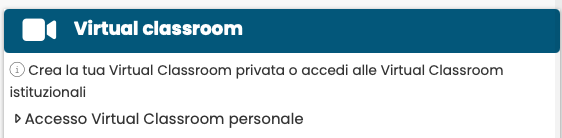
Immagine
Screenshot integrazione portale della didattica zoom

For teaching activities, Zoom is integrated with the Politecnico’s Teaching Portal. By accessing the “Virtual Classroom” section on the page of your courses, you can start and manage online lessons directly from the course page, also simplifying the management of recordings and their publication to students.

It is also possible to access your personal Virtual Classroom through the Teaching Portal by going to the “Virtual Classroom” section on the main page of the Teaching Portal, where you can select either “Zoom” or “Big Blue Button” as the platform.

Immagine
ACCESSO A ZOOM

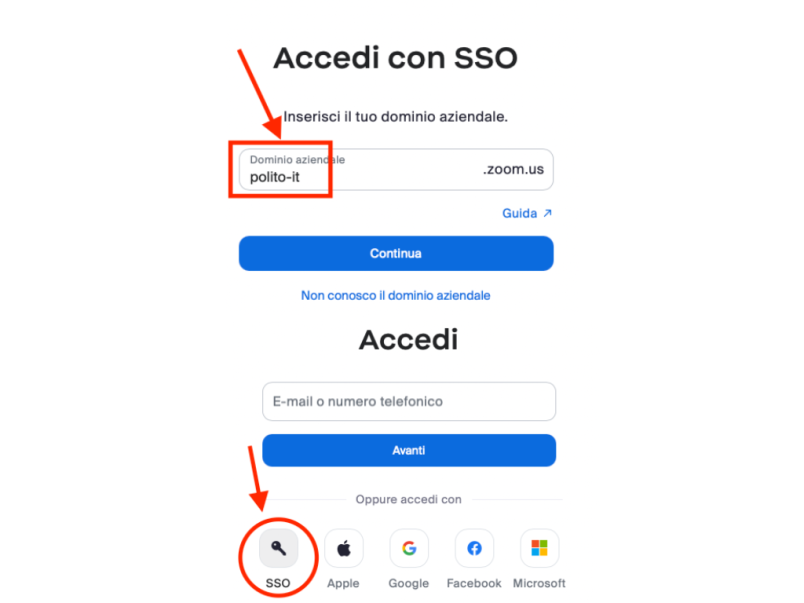
To use the institutional license, you must authenticate through the Politecnico di Torino Single Sign-On (SSO) system:

  1. Open the Zoom authentication page (web or desktop application)
  2. Select “Sign in with SSO” 
  3. Enter “polito-it” as the company domain (make sure to use the hyphen “-” and not a dot) 
  4. The system will automatically redirect you to the Politecnico authentication page
  5. Complete the login using your institutional credentials

Once authenticated, your Zoom account will be automatically associated with the University’s Business license.

Who is intended for

 
Immagine
icona docenti

Faculty